
Technical capabilities
The details for CNC operators and designers: notes for MasterAT and Panhans, hardware, materials, costing and the glossary.
Masterwood MasterAT
For every part, Tezga writes an editable graphical TLF project. The operator imports, simulates and compiles it in MasterAT; MasterAT drives the machine. Tezga does not connect to the machine and never starts it.
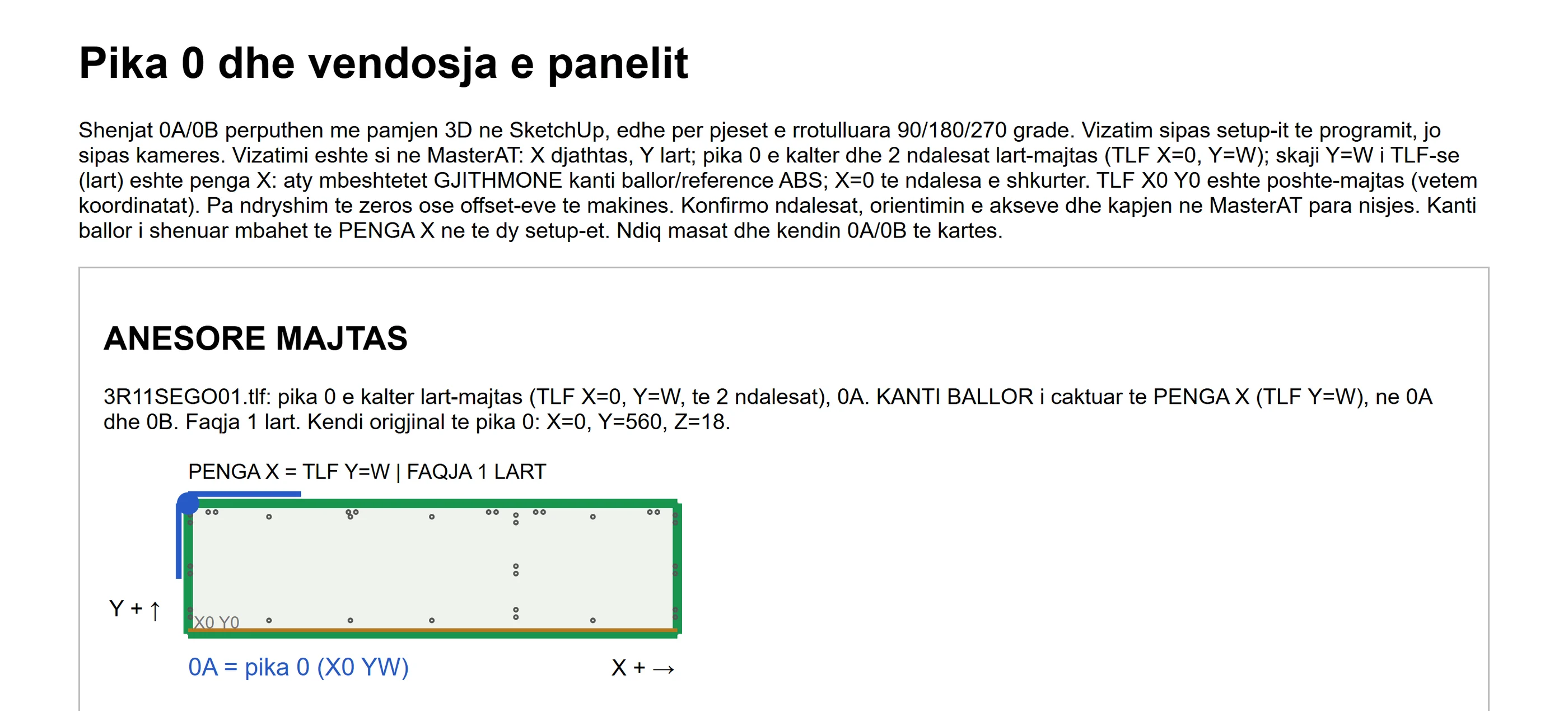
Programs 0A and 0B
A part machined on one face gets program 0A. A part machined on two faces also gets 0B, for the other face. The label carries a barcode for each program.
Fence and edge band
The declared front edge, with its edge band, goes on the X fence (TLF Y = W) in both programs. The setup guide shows, for each panel, point 0, the face up, the edge with edge band on the fence and the X/Y directions.
Routes
Openings in the middle of a panel leave a 2 mm skin to protect the machine’s vacuum pods. Open routes start outside the panel. Every new contour, notch or cut-out stays blocked until the workshop approves it after the simulation and the first piece.
Pre-export checks
Doctor and the export stop and name the problem: an unverified cutter radius, an outline with no route, a panel changed after machining, Minifix links that need recovery or an unapproved route. “Locate panel” takes you to the part in the model. Before a rebuild, Tezga counts the manually added machining that would be lost.
Tools
In production, MasterAT imports the programs and picks the tool by itself. The machine’s tool table must match the program, for example a Ø3 tool for pilots.
Before cutting
Every new project revision is simulated in MasterAT before cutting, so the operator sees the result before the first piece.
Panhans saw
Tezga writes the S01 file for the saw optimiser and a 100 × 65 mm label for every piece.
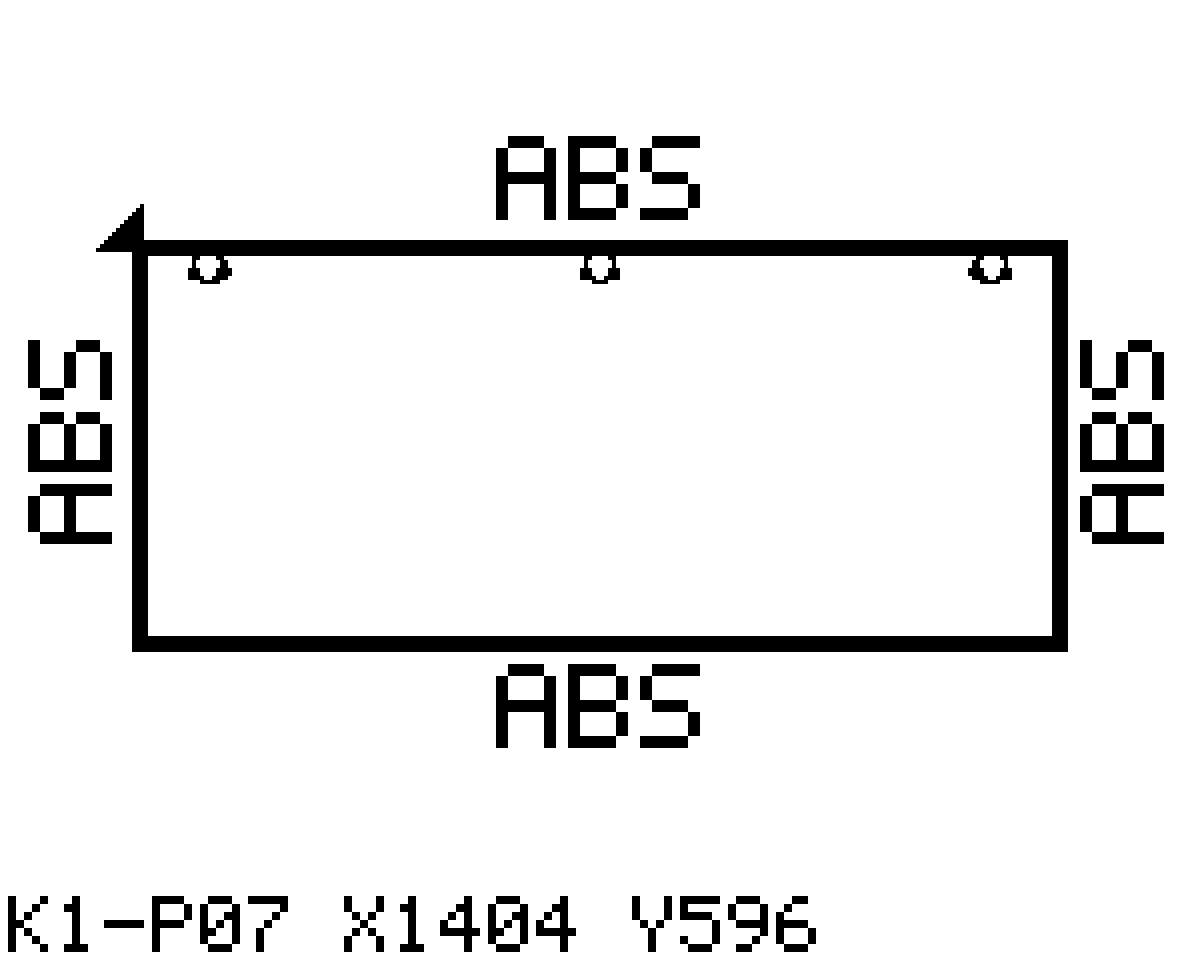
Label and barcode
The Code128 barcode holds the CNC program name, so scanning it at the machine opens the right program. Two-sided parts also get the program 0B barcode; DOPIO parts get a label for each ply. The label shows a 2D picture of the part with its edge band and the workshop’s logo, not the Tezga brand.
Unique codes and copying
Every physical piece gets a unique code. The copy command puts the S01, pictures and label on the saw PC and keeps backups. If a program or picture has the same name but different content, copying stops.
Edges and materials
The S01 says which edges get edge band, not the band thickness. Material and stock codes are entered by the workshop and stored on that PC.
Cutting plan
The final plan is made by the Panhans optimiser; Tezga gives a preliminary layout with OpenCutList. Parts longer than the sheet are split only when you ask, with the “split parts longer than the sheet” command.
DOPIO
A 34 mm part is two 17 mm boards and a 36 mm part two 18 mm boards, glued. The saw cuts two plies with 5 mm extra on every side; the CNC machines the glued part with one program, and the Minifix goes to the centre of the cam-side ply.
Proven at the saw
The blade width is a workshop parameter. The barcodes are scanned at the saw and open the right program every time.
Hardware and articles
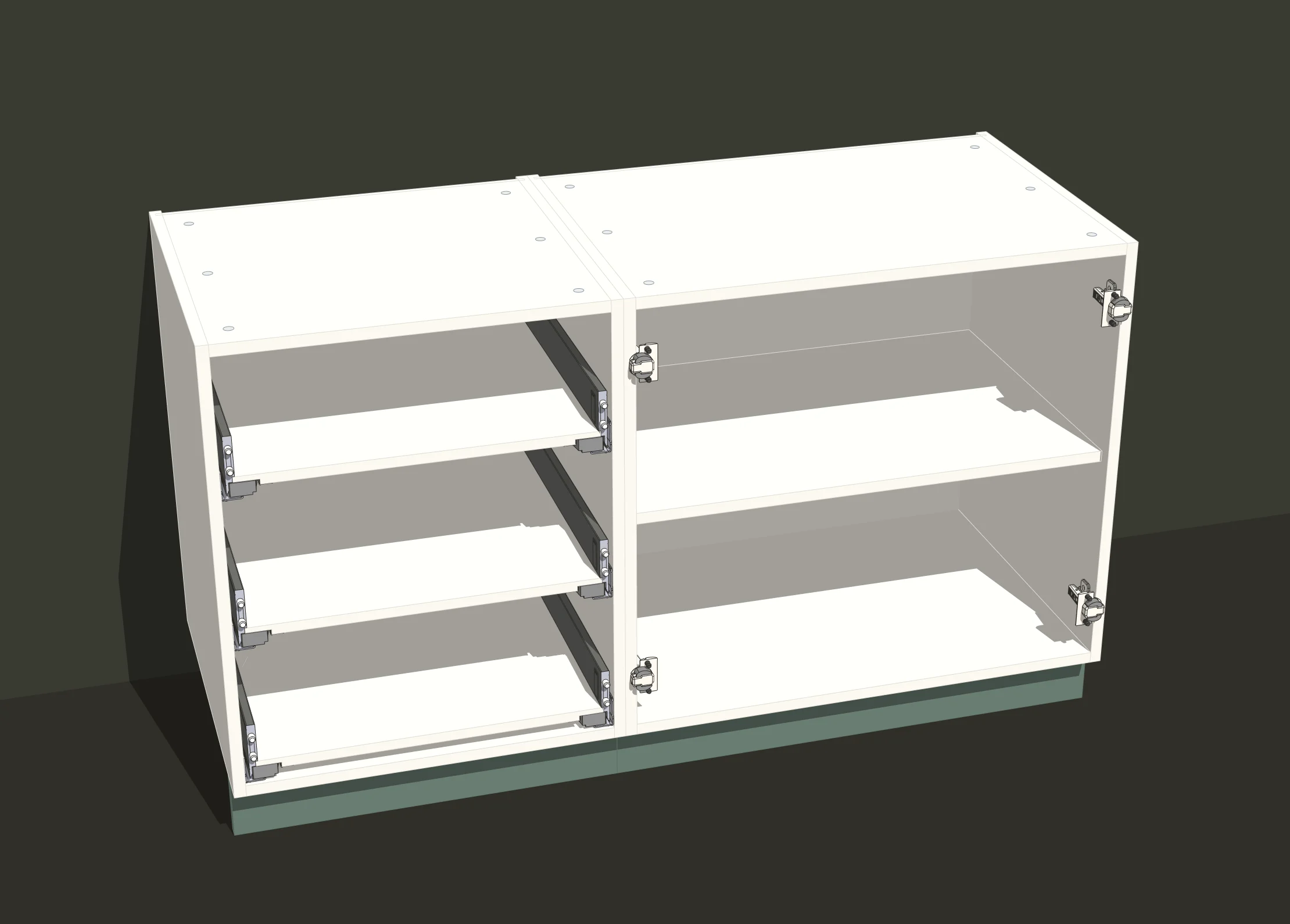
Blum recipes in D
CLIP top 110° full overlay; 110° half overlay on a divider (71B3650, 71B3680, 71B3690, 71T3650); 110° inset (71B3750, 71B3780, 71B3790, 71T3750); AVENTOS HK top with four system-screw and four wood-screw variants (22K2300/2500/2700/2900); LEGRABOX MPR M/K/C.
Häfele recipes in D
Metalla 310 hinge 311.04.249 with plate 311.70.610; Matrix UM A30 runners NL 270–550 (433.03.650–656); Matrix Box S35 552.56.795; wardrobe lift 805.20.081 (CNC under conditions); shelf pins, handles and Pacofix PF / PF-L clips.
Blum library
3,461 articles: 439 with a manufacturer reference and 3,022 placeholders that stay blocked until they have one. Ø2.5 pilots are replaced with Ø3 only in the Blum library, with the workshop’s authorisation; depths are unchanged. The diameter substitution was tried with Häfele drawers and worked.
Full Blum and Häfele library
Thousands of Blum and Häfele articles with 3D, ready to place from the library and counted in the hardware list.
3D and drilling
Recipes place the 3D mechanism and its drilling together. Drilling is stored as machining data, so it does not always appear as a hole in 3D; it is checked in E, Doctor, the export, the MasterAT simulation and the first piece. Where the manufacturer supplies CAD, that CAD is used; where it is missing, the view is schematic and listed in the missing-CAD register.
No CNC, but listed
Häfele legs appear in the hardware list and as schematic 3D; the plate is mounted with a template. Glass and mirrors come out in a separate CSV list, with drilling DXF files for the glazier.
Materials and catalogues
Material and thickness
Chosen separately for the carcass, fronts, covers, back and drawer boxes, even for each side, bottom, top, divider or shelf. Thicknesses run from 12 to 36 mm, including MDF 30 and DOPIO 34/36.
Decor catalogues
14 veneer textures (F01–F14); 2,831 RAL codes (Classic 216, Design 1,825, Effect 490, Plastics P1 100 and P2 200); 160 EGGER decors from the Averex 2026 catalogue (149 unique codes). A finish goes on the carcass, fronts and back separately, or on all of them. The catalogues work offline.
Grain
The grain direction shown in 3D follows the production grain. Changing the grain requires a rebuild, so the 3D model and the CNC data stay the same.
Edge band and cutting list
The cutting list is grouped by material family and real thickness. Edge band is marked per edge, and sizes are finished sizes: no hidden panel reduction. Workshop rule: every visible edge, including on an open drawer, gets edge band.
Lists
The model produces the cutting list, the material list (board m², metres of edge band and number of sheets) and the hardware list by brand; a preliminary cutting layout is made with OpenCutList. Glass and mirrors come out in a separate CSV list, with drilling DXF files for the glazier.
Colours on screen
RAL colours are screen approximations, not calibrated samples; EGGER decors are catalogue samples, not full-board textures. A colour does not change material or thickness.
Cost and offer
The “Kosto dhe ofertë” (Cost and offer) module (Extensions → Tezga) calculates an internal cost estimate from the visible model and the workshop’s rates, and creates a customer summary for complete estimates.
Quantities
Taken from the same sources as the cutting list and the hardware list: board m², metres of edge band and hardware from the recipes. DOPIO parts count as two plies with the cutting allowance, the edge band once. The board quantity is the part area, not a cutting plan or an exact sheet count.
Rates
Prices are net, in EUR per unit, entered by the workshop and stored on that PC. The hardware unit must match the list unit. Labour is hours times rate; an explicitly entered zero excludes a task.
Calculation
Waste is applied to quantities. Markup on cost and margin on sale use separate formulas. Sale VAT is entered explicitly. Each line is rounded to the cent, then summed.
When an input is missing
A blank price is not zero. Without the required inputs there is no sale total: the estimate is marked incomplete, the known subtotal is kept and no offer sheet is created. Walls and appliances are not priced as board, and unclassified materials stay visible with a note.
Linking supplier prices
The operator picks a hardware row from the model and a source in the supplier price list, and confirms the code, variant, units per pack and purchase VAT. Tezga recalculates the net price per list unit from the installed catalogue, not from a value typed into the window. A missing price, an unverified source or an unknown VAT basis stops the price calculation. There is no automatic code matching, sets are not split into components, and material, edge band and labour are not linked this way.
Saving and price source
Each estimate is saved in a dated folder as KOSTO.html and KOSTO.json; an incomplete estimate can be saved too, labelled as such. On saving, a linked rate is recorded together with its source; editing the price by hand removes the link to the source. A saved price does not update itself when the supplier catalogue changes. When a price, waste, hours, margin or VAT changes, the old amounts are cleared until recalculated. A late response, from the calculation or from the supplier lookup, never replaces the newer result.
Customer offer
When the estimate is complete and has no warnings, saving also creates OFERTA.html: the project, the time of the model snapshot, net sale, VAT rate and amount, and the total. The sheet contains no purchase prices, supplier sources, cost lines or margin. It is a preliminary summary, not an invoice; it prints on A4 from the browser or is saved as PDF from the print dialog.
Glossary
Commands
- D
- The cabinet dialog: dimensions, zones, fronts, materials and hardware recipes.
- F
- Drawers between four existing panels, with the same recipes as D, without building a second carcass. Up to four drawers behind one front.
- P
- Loose parts, e.g. MDF, outside a carcass.
- E
- The panel and its machining in 2D: bores, grooves and routes.
- N
- The under-stairs cabinet (model creation, no CNC).
- MM
- The Atelier assembly manual, A3 colour, from the whole visible model.
- Doctor
- The production check before export, on the same data as the export; “Locate panel” takes you to the part with the problem.
Terms
- TLF
- MasterAT’s graphical project; Tezga writes one per part.
- 0A / 0B
- The program for the first face and the program for the other face of parts machined on two faces.
- S01
- The cutting-list file for the Panhans saw optimiser.
- Edge band (ABS)
- The strip that covers a board edge. Workshop rule: every visible edge gets edge band, and list sizes are finished sizes.
- DOPIO
- A 34 or 36 mm part made of two glued 17 or 18 mm boards.
- Minifix
- The cam-and-bolt joint between panels, with Ø8 × 35 dowels.
- Pilot
- A small hole for the hardware screw; the workshop confirms its diameter and depth.
- MPR
- The drilling data Blum publishes for its articles.
- X fence, point 0
- The machine reference; the front edge with edge band goes on the X fence.
- Gola
- The notch milled in the carcass for the aluminium handle-less profile.
- Part code (K1-P07)
- Cabinet and part number: K1 is the cabinet, P07 its part. The same code appears on the label and in the assembly manual.
- KOSTO.html / KOSTO.json
- The internal report of an estimate, with the cost lines and price sources.
- OFERTA.html
- The customer summary of a complete estimate: net sale, VAT and total, without purchase prices or profit.